saqlain-abbas.md / blog19 February 2026, corrected 3 October 2026
ClipStream: finding what I copied three hours ago
Update, 3 October 2026: ClipStream has since been rebuilt from the ground up in C++ and Qt 6. This note describes the first version, in Rust and Tauri, which is kept on the repo's legacy branch.
I wanted a clipboard manager that feels like a native part of Windows, launches instantly, and helps me find what I copied three hours ago. So I built ClipStream.
Why another clipboard manager
Windows has a built-in clipboard history on Win+V, but it falls short for developers and power users:
There is no source tracking. You can't tell which app copied something.
Search is limited. There is no full-text search across your history.
Nothing persists. The history clears on restart.
The UI is clunky and was not designed for keyboard-first work.
What it does
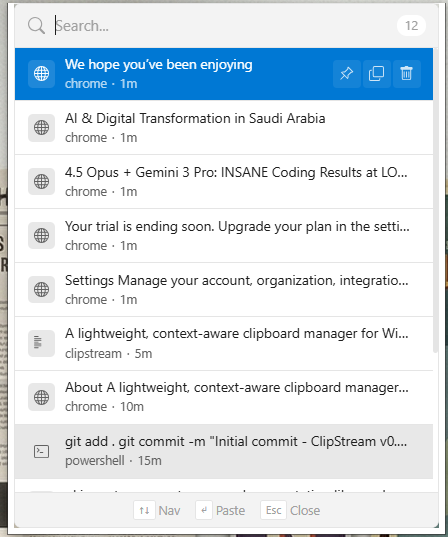
ClipStream is a small clipboard manager that watches your clipboard and keeps a searchable history of everything you copy. It runs in the system tray and appears with Ctrl+Shift+V.
Ctrl+Shift+Vopens it from anywhere.Search is full-text, powered by SQLite FTS5.
Every clip shows which application it came from.
Select a clip and it pastes into the active window.
Pinned clips stay at the top of the history.
The overlay is frameless, so it sits in Windows like part of it.
The first stack
Like my other desktop tools at the time, ClipStream was built with Tauri v2 and Rust. The Rust backend did the system work:
watching the Windows clipboard for changes
working out which application made the copy
SQLite with FTS5 for full-text search
positioning the frameless overlay and handling focus
SQLite with FTS5
The clipboard history is stored in a SQLite database with FTS5, its full-text search extension. That gives ranked results, so the best matches come first, and a history that survives restarts and stays on your machine.
How source tracking works
When you copy something, ClipStream doesn't just store the text. It also records which application made the copy:
When the clipboard changes, ClipStream asks for the foreground window handle with
GetForegroundWindow.From the handle it gets the process ID with
GetWindowThreadProcessId.It reads the process name with
QueryFullProcessImageName.That is stored next to the clip in SQLite.
So you can search by content and also filter by source application. Copied a URL from Chrome three hours ago? Just search for it.
How auto-paste works
When you pick a clip from the history, ClipStream writes it to the clipboard.
It then simulates a
Ctrl+Vkeypress with the WindowsSendInputAPI.The clip is pasted into whatever window was active before ClipStream opened.
The whole path is Ctrl+Shift+V, search, Enter, pasted.
Staying out of the way
ClipStream is designed to be invisible when you don't need it. Clipboard monitoring is event-driven, so it does not poll while idle.
ClipStream is open source, MIT licensed. Your clipboard history deserves better than Win+V.