ClipStream Win+V forgetting
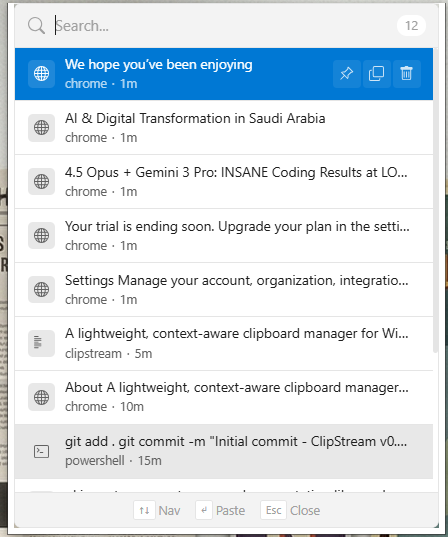
ClipStream is a clipboard manager for Windows. It remembers what you copy, text and images, shows which app each copy came from, and lets you search all of it. Ctrl+Shift+V opens it at your cursor.
I wanted a clipboard manager that feels like a native part of Windows, launches instantly, and helps me find what I copied three hours ago.
Why I built it
Windows has a clipboard history on Win+V, but it falls short:
You can't tell which app a copy came from.
There is no full-text search across the history.
The history clears on restart.
It was not designed for the keyboard.
Two versions
The first version, released in November 2025, was Rust and Tauri with a Preact interface. I have since rebuilt it from the ground up in C++ and Qt 6, so that it is fully native. The original code is kept on the legacy branch.
The current stack is C++17 and Qt 6 Widgets, SQLite with FTS5 through Qt SQL, and Win32 calls for the hotkey, the paste and the foreground window. CI builds an installer on every push.
How it works
Capture is event-driven. ClipStream listens to the OS clipboard and does not poll.
Search is SQLite FTS5 across the whole history.
When something is copied, it asks Windows for the foreground window with
GetForegroundWindowand stores the app's name next to the clip.Choosing a clip writes it to the clipboard and then simulates
Ctrl+VwithSendInput, so it lands in the window you were in. The whole path isCtrl+Shift+V, search, Enter.Ctrl+1toCtrl+9paste the Nth clip directly.It masks detected secrets, excludes password managers and has a pause switch.
What I learned
SQLite FTS5 is enough for a local search problem like this one.
Watching the Windows clipboard reliably means handling ownership-transfer events with care.
Auto-paste has to beat focus-loss races. It is a small but tricky class of bug.
ClipStream is open source, MIT licensed.