saqlain-abbas.md / blog29 March 2026, corrected 3 October 2026
NetLogo MCP: nothing existed, so I built one
As an AI student in my 6th semester, I was taking an Agent-Based Modeling course that uses NetLogo heavily. Around the same time I discovered MCP, the Model Context Protocol: Anthropic's open standard that lets AI assistants work with external tools and services.
I immediately searched for a NetLogo MCP server. Nothing existed, for NetLogo or for any other agent-based modeling platform. That gap was too exciting to ignore. So I built NetLogo MCP, the first MCP server for NetLogo.
What it does
The idea is simple. Instead of writing NetLogo code by hand, clicking buttons and tweaking sliders, you tell your AI assistant what you want in plain English:
"Create a predator-prey model with 100 sheep and 20 wolves."
"Run it for 500 ticks and show me the population dynamics."
"What happens if we double the wolf reproduction rate?"
The AI writes the code, runs the simulation and shows you the results, all through conversation.
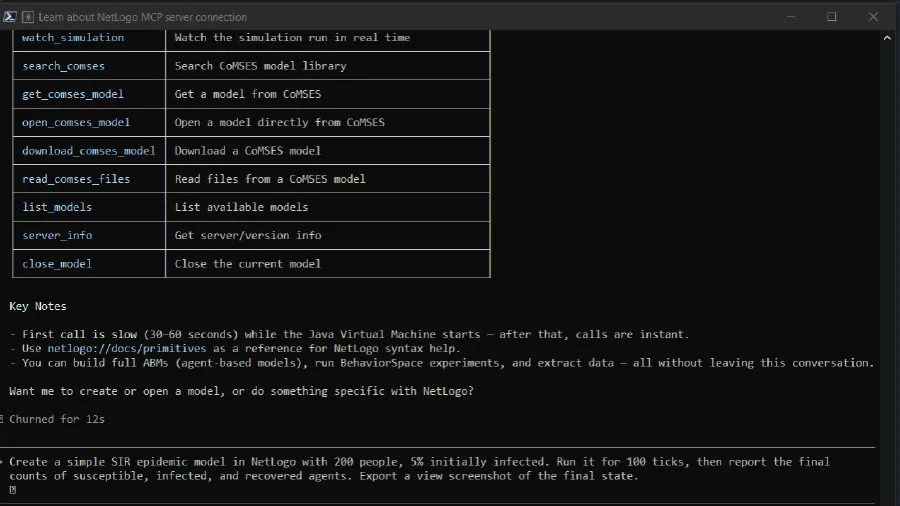
It works with 11 MCP clients: Claude Code, Claude Desktop, Cursor, Windsurf, VS Code (Copilot), Cline, Continue, Roo Code, Zed, OpenCode and Codex.
How it works
You, in any MCP client
  → AI assistant
  → NetLogo MCP server
  → NetLogo (GUI or headless JVM)
Your AI sends commands over MCP, NetLogo executes them, and the results come back: simulation data, agent counts, and snapshots of the view that you can see right in the chat.
When I first wrote this note, the server had 12 tools and ran NetLogo headless by default. It now has 25 tools and opens a real NetLogo window by default, so you can watch the simulation run. Headless mode is still there for CI and servers.
The stack
The server is built on FastMCP, a typed Python framework for MCP servers. pynetlogo and JPype connect Python to NetLogo's Java runtime. The transport is MCP over stdio.
The 25 tools cover the whole life of a simulation:
create a model from NetLogo code, with real sliders, switches, buttons and monitors
run a number of ticks and collect the data as markdown tables
run BehaviorSpace experiments as parallel parameter sweeps
export the current view as a PNG, visible inline in the chat
inspect the world state, sample the agents, and read patch data as a grid for heatmaps
search CoMSES Net and safely run models from it
NetLogo references ship with the server as MCP resources: the primitives, a programming guide and a guide to the move from NetLogo 6 to 7. There are also prompts for common workflows, such as analyzing an existing model, building a new one and running a parameter sweep.
Protecting stdout
One tricky problem: NetLogo's JVM loves to print to stdout. Startup messages, warnings, garbage collection logs. But MCP uses stdout as its channel, and any stray output corrupts the protocol.
The solution was to intercept stdout at the Python level, redirect all JVM output to stderr, and make sure only clean MCP JSON goes through stdout. This took more debugging than I'd like to admit.
A live window, or headless
The server has two modes. With the live GUI, which is the default, a real NetLogo window opens and you watch the simulation run while the AI controls it. In headless mode there is no window, and you see snapshots inline in the chat through export_view.
GUI mode runs NetLogo on a separate thread so the MCP server stays responsive. The mode is set at startup through an environment variable.
What was hard
JVM lifecycle
JPype, the bridge between Python and Java, is notoriously finicky. The JVM can only be started once per Python process, classpath issues cause cryptic errors, and thread safety needs careful handling. Getting reliable startup across different operating systems and Java versions was the biggest engineering problem.
Eleven clients, eleven configs
Every MCP client has a slightly different configuration format. Claude Code uses .mcp.json, VS Code uses .vscode/mcp.json with different key names, Zed uses context_servers. I had to test and document the setup for each client to make the project usable.
Testing without NetLogo
The test suite uses mock fixtures, so contributors can run the tests without installing Java or NetLogo. This was essential. CI pipelines shouldn't need a JVM just to validate Python logic.
Where it is now
NetLogo MCP is on PyPI, in the official MCP Registry and listed on LobeHub. It shows that MCP can connect AI assistants to scientific tools in a specific field, not just to developer utilities.
The project is also a proof of concept for a bigger idea: AI-assisted scientific simulation. If we can make NetLogo conversational, we can do the same for MATLAB, R, GAMA, or any other modeling platform.
Three prompts to start with
Install it with pip install netlogo-mcp, connect your client, and start with one of these:
"Create a simple NetLogo model with 50 turtles doing a random walk. Run setup, simulate 100 ticks, and export the view."
"Open the Wolf Sheep Predation model and run a parameter sweep on initial-number-wolves from 10 to 100."
"Build a disease spread model with sliders for population size and infection chance."