NetLogo MCP
I searched for an MCP server to control NetLogo. Nothing existed. So I built one.
NetLogo MCP lets an AI assistant build, run and measure agent-based models from a conversation. It began as a course project and is now on PyPI and in the official MCP Registry.
Why I built it
I was in my 6th semester, taking an agent-based modeling course that uses NetLogo heavily. Around the same time I discovered MCP, the open standard that lets AI assistants work with outside tools.
I immediately searched for a NetLogo MCP server. Nothing existed, for NetLogo or for any other agent-based modeling platform. That gap was too exciting to ignore.
Before this, building a model meant writing NetLogo code by hand, wiring up sliders and buttons, clicking through runs and copying the numbers out. That is slow, and it keeps the interesting part, asking questions of a simulation, behind a lot of busywork.
How it works
You, in any MCP client
  → AI assistant
  → NetLogo MCP server
  → NetLogo (GUI or headless JVM)
The server is Python on FastMCP. pynetlogo and JPype connect it to NetLogo's Java runtime, and it talks to the client over stdio.
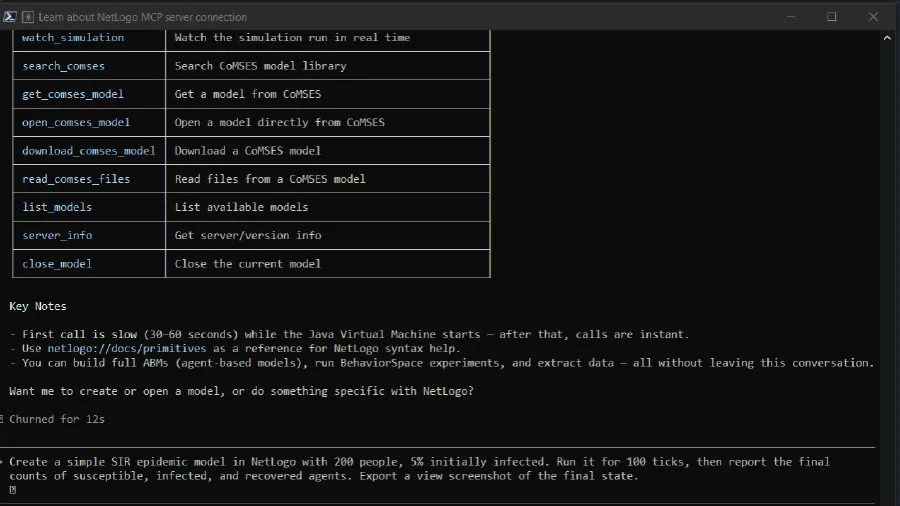
It exposes 25 tools. They cover:
creating a model from code, with real interface widgets: sliders, switches, buttons and monitors
running a simulation and collecting tick-by-tick data as markdown tables
BehaviorSpace experiments, run as parallel parameter sweeps through the headless launcher
exporting the view as a PNG that shows up inline in the chat
inspecting the world, the agents and the patches
searching CoMSES Net and safely running models from it
By default a real NetLogo window opens, so you can watch the simulation run. Headless mode is there for CI and servers. The window opens on the first tool call, not when the client connects, and the README warns that this first call takes 30 to 60 seconds while the JVM starts.
It works with 11 MCP clients: Claude Code, Claude Desktop, Cursor, VS Code Copilot, Windsurf, Cline, Roo Code, Continue, Zed, OpenCode and Codex.
pip install netlogo-mcpThe hard part
NetLogo's JVM prints to stdout: startup messages, warnings, garbage collection logs. MCP uses stdout as its channel, so any stray output corrupts the protocol. The fix was to intercept stdout in Python, send all JVM output to stderr, and let only clean MCP JSON through. This took more debugging than I'd like to admit.
JPype, the bridge between Python and Java, is notoriously finicky. The JVM can only be started once per Python process, classpath mistakes cause cryptic errors, and threads need careful handling. Getting a reliable startup across operating systems and Java versions was the biggest engineering problem.
Every client also has its own config format. Claude Code uses .mcp.json, VS Code uses .vscode/mcp.json with different key names, Zed uses context_servers. I tested and documented the setup for each one.
What I learned
Good MCP tools are small and composable. Let the model plan, and keep each tool obvious.
Returning results as markdown tables and PNGs makes a simulation readable inside a chat.
A setup prompt you can copy and paste beats a long install guide.
NetLogo MCP is open source, MIT licensed.