saqlain-abbas.md / blog19 February 2026, corrected 3 October 2026
PortKiller: port 3000 is already in use
You run npm start and get hit with "Port 3000 is already in use."
The typical workflow is painful. Open Task Manager, try to find which process is hogging the port, maybe open a command prompt to run netstat -ano | findstr :3000, find the PID, then taskkill /PID xxxx /F. All of this while your dev server waits.
I got tired of this friction, so I built PortKiller.
What it is
PortKiller is a small, always-ready Windows utility that shows which processes are using your ports and lets you kill them with a keystroke. It runs quietly in your system tray and appears only when you need it.
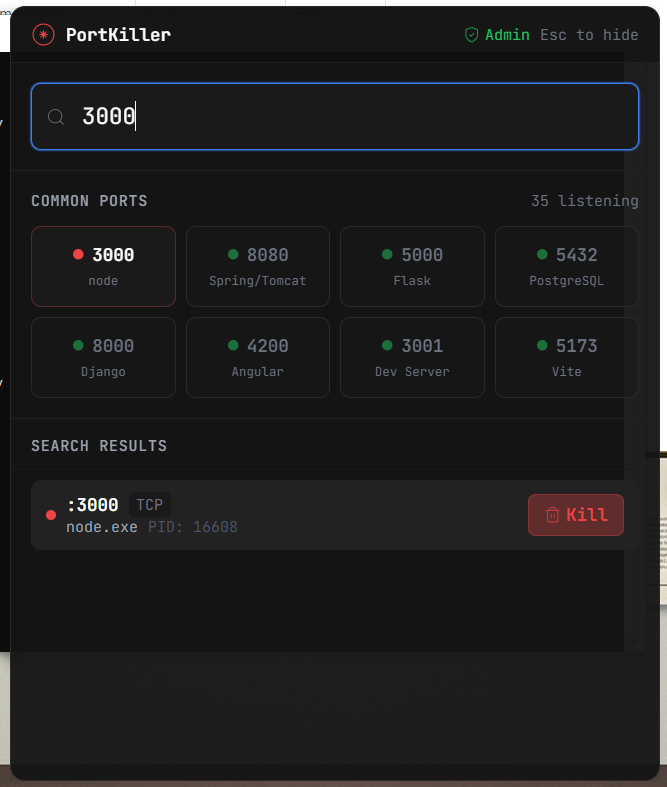
Press Alt+P from anywhere and an overlay appears. Search for a port, see which process is blocking it, hit Enter to kill it. Done. Back to coding in seconds.
Alt+Pshows and hides it from anywhere on your desktop.Arrow keys move through the list, Enter kills, and fuzzy search filters.
The command palette takes
kill 3000,adminorrefresh.Ctrl+Clickselects several processes to kill together.Newly opened ports are highlighted.
Double-click a process to see its memory, CPU usage and quick actions.
You can configure the development ports you use most.
One click restarts PortKiller as administrator, for system ports.
Since I wrote this, a kill takes two presses. The backend checks the process again before it terminates it.
How it is built
The backend is Rust, which handles the processes and the Windows API. The frontend is Preact and TypeScript. The shell is Tauri v2, and the styling is Tailwind CSS.
Why Rust for this
Managing Windows processes at the system level means working directly with the Windows API. Rust gives me two things there:
Safety. No null pointer crashes when dealing with process handles.
Direct Win32 access, through the
windowscrate.
The port scan
PortKiller calls
GetExtendedTcpTablefrom the Windows IP Helper API to get all active TCP connections.It maps each connection's PID to a process name with
OpenProcessandQueryFullProcessImageName.It presents a live view that updates when ports change state.
Keyboard first
Every interaction in PortKiller can be done without touching the mouse:
type to search and filter
arrow keys to move through the list
Enter to kill the selected process
Escto hide the window/to focus the search bar
PortKiller is open source, MIT licensed. If port conflicts frustrate you as much as they frustrated me, it is on GitHub.