PortKiller netstat, then taskkill
PortKiller is a Windows utility that shows which process is holding a port and kills it from the keyboard. Press Alt+P, type the port, press Enter twice.
I built it because "Port 3000 is already in use" kept sending me to Task Manager, then netstat, then taskkill, all while my dev server waited.
Why I built it
You run npm start and get hit with "Port 3000 is already in use."
The usual fix is painful. Open Task Manager and try to find the process hogging the port. Maybe open a command prompt, run netstat -ano | findstr :3000, find the PID, then taskkill /PID xxxx /F. All of this while your dev server waits.
I got tired of this friction, so I built PortKiller.
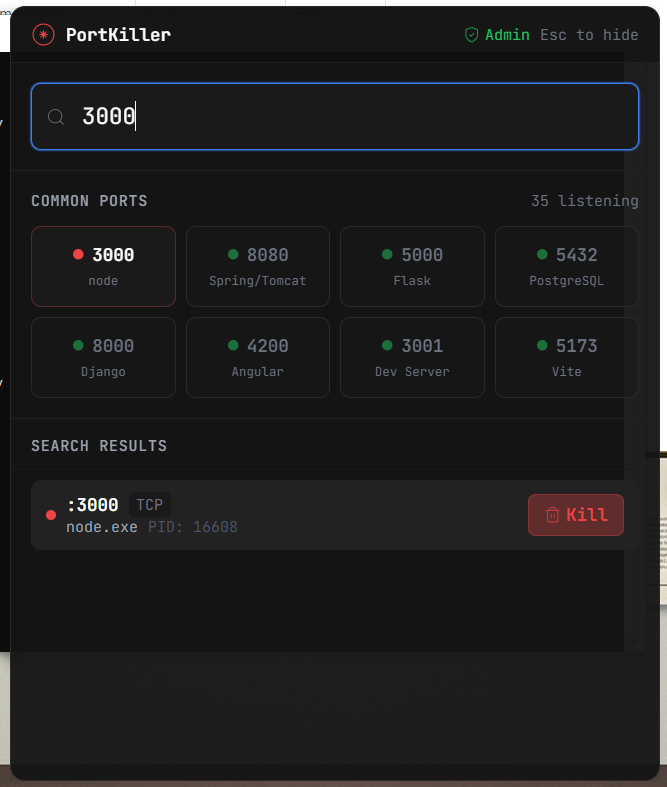
How it works
PortKiller sits in the system tray and appears only when you call it.
Alt+Pshows and hides the overlay from anywhere. You can change the shortcut in Settings.Everything works without the mouse: arrow keys or
jandkto move, fuzzy search to filter, or just start typing a port number.The search bar takes commands, such as
kill 3000,kill 3000-4000,adminandrefresh.Each row shows the command line, so five
node.exerows can be told apart by what they are running.Every kill takes two presses. The backend checks the process again before it terminates it, and the result tells you whether the port was actually freed.
You can mark your own processes as never-kill, or take a process down together with its children.
The backend is Rust on Tauri 2. It calls GetExtendedTcpTable from the Windows IP Helper API to read the active connections, then maps each PID to its process name with OpenProcess and QueryFullProcessImageName. Nothing shells out to netstat. The interface is Preact and TypeScript.
What I learned
Native APIs beat shelling out, for speed and for reliability.
Preact is a good fit when bundle size matters more than the reach of the React ecosystem.
Global hotkeys on Windows need careful conflict handling. Test against the tools people already run before shipping.
PortKiller is open source, MIT licensed, and Windows only.