Paperling the vault
Paperling is a markdown reader and editor. You open a file and write. There is no vault to create, no plugin to install and nothing to set up first.
I built it because I live in markdown files, and opening one outside an IDE meant raw syntax in Notepad or something heavy like Obsidian. That was total overkill when all I wanted was to open one file and edit it.
Why I built it
Documentation, notes, project READMEs: most of what I write is a .md file. Notepad shows it as raw text with every symbol in the way. Tools like Obsidian are powerful, but vaults, graphs and plugins are a lot to accept before you can read one file.
I wanted something you just open and write in. It should render the page properly and keep the raw text one keystroke away.
How it works
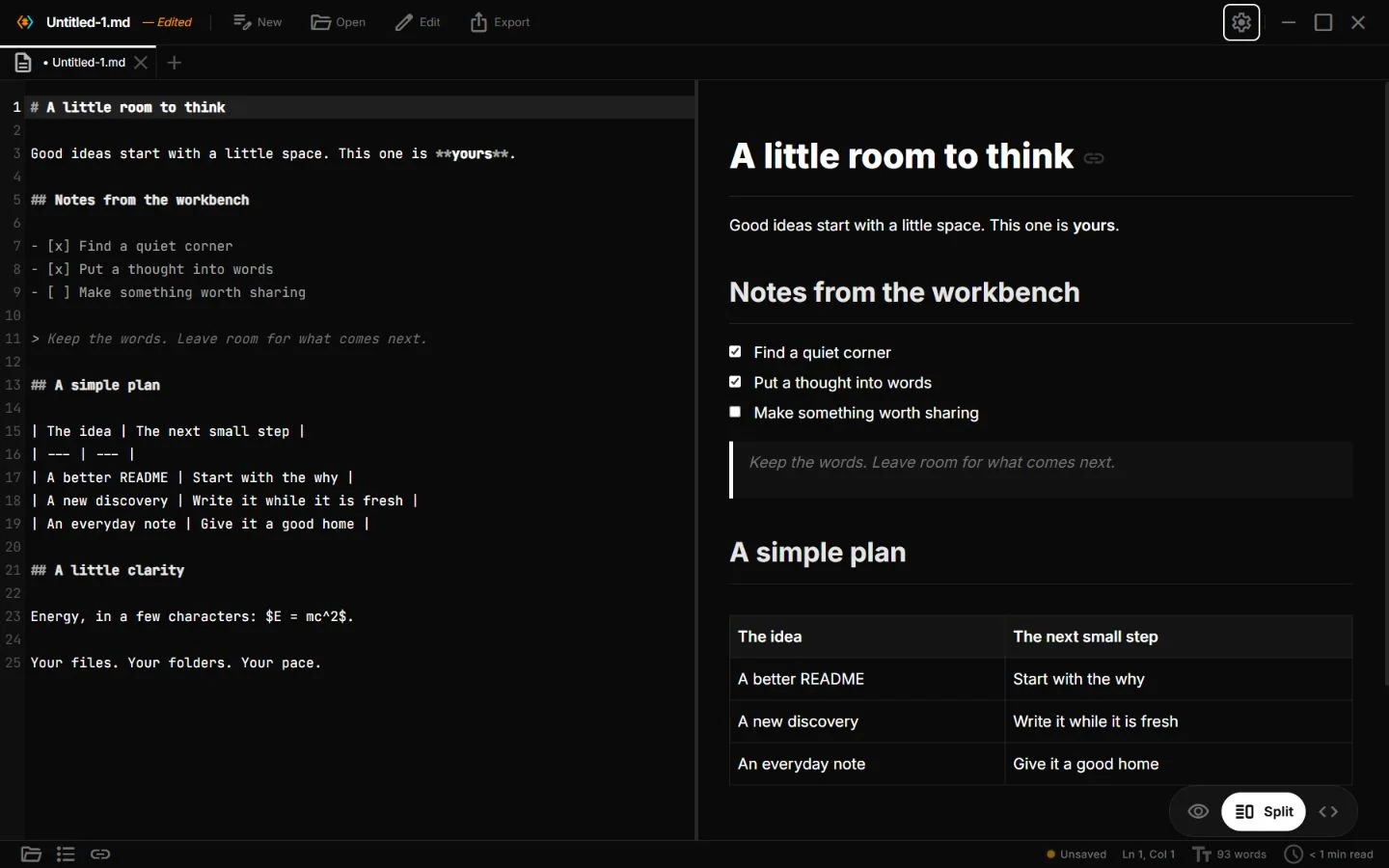
There are three views of the same file: Reader, Code and Split.
Ctrl+Eswitches between reading and editing,Ctrl+\opens the split, and the two panes scroll together in both directions.Math, chemistry and diagrams render as you type, through KaTeX, mhchem and Mermaid. Each renderer loads only when a document uses it.
The preview writes back. Ticking a task checkbox in the Reader changes the source file.
The AI panel is bring-your-own-model. It works with any OpenAI-compatible endpoint, including OpenAI, Gemini, Ollama and llama.cpp, and the API key is stored in the OS keychain.
In agent mode the AI never writes by itself. Every proposed change shows up as an inline diff, and you accept or reject each one. Nothing is written until you approve.
The shell is Tauri 2 with a Rust backend. The interface is React and TypeScript.
It runs on Windows, macOS, Linux and Android. GitHub Actions builds the installers for all four on every release.
Where it stands
On GitHub it has 575 stars, 82 releases and 12,879 release downloads, counted on 3 October 2026. The first release went out 84 minutes after the first commit.
The hard part
Scroll sync in split view was harder than it looks. Source lines do not map evenly to rendered heights: a one-line Mermaid block can render as a tall diagram. Keeping both panes aligned while either one scrolls took anchor points that map source positions to rendered elements.
Other tools touch the same files, so Paperling watches the open file. When it changes on disk, the app asks whether to reload or keep your version. It never silently overwrites newer work.
The inline diffs had to feel like part of the editor. Proposed changes are drawn in the text itself, each with its own accept and reject controls. That meant a small change-tracking layer on top of the editor state, in place of a separate diff view.
What I learned
The best feature is the one you don't make people configure.
Loading heavy renderers only when a document needs them keeps a full editor quick to open.
AI edits earn trust when they are diffs you can review, not silent rewrites.
A clear launch story, why this exists and who it is for, moves more people than a feature list.
Paperling is open source, Apache 2.0 licensed.