Editor
Edit in seconds.
Trim, cut, speed up and draw on the video. One timeline, no video suite.
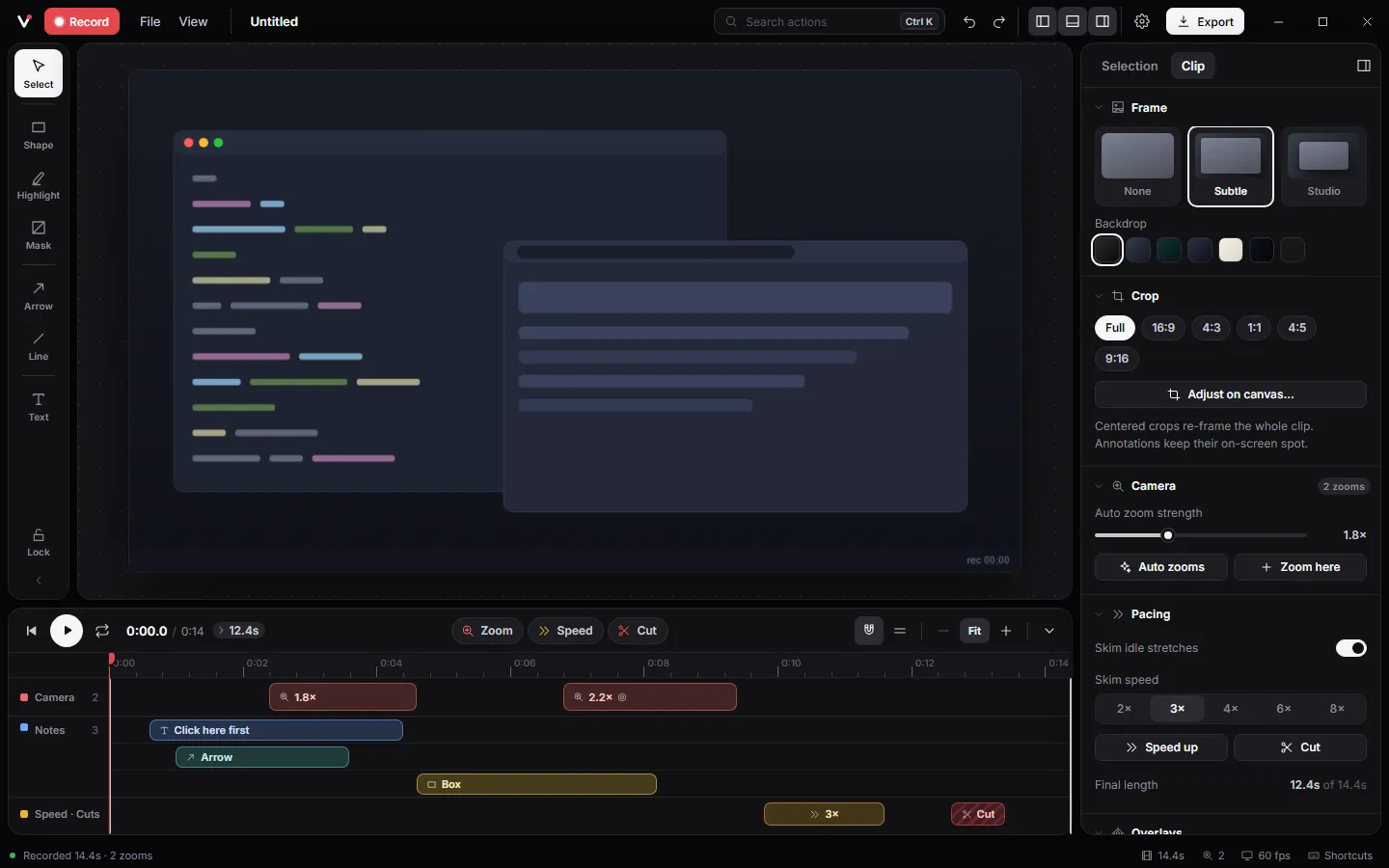
How it works.
- 1
Trim the ends with I and O.
- 2
Cut the fumbles with C, skim the waiting with X.
- 3
Add text, arrows or a spotlight, then export.
Details
Skim idle
Dead stretches play at 2 to 8 times speed, so waiting for a page never makes it into the video.
Annotations
Text, arrows, lines, boxes, a pen and marker, highlights, a spotlight, and blur masks to hide secrets.
Visual crop
Drag a crop right on the video with aspect locks and thirds guides.
Undo everything
Every edit is undoable, and projects save in seconds as .vuoom files.
Shortcuts.
- I
- Trim start at the playhead
- O
- Trim end at the playhead
- C
- Insert a cut
- X
- Insert a speed-up
- T
- Text tool
- L
- Spotlight
Questions.
Can I blur passwords or emails?
Yes. Add a mask with the Hide tool (M). It stays on the video for as long as its timeline bar.
Does editing lower the quality?
No. Edits are instructions on top of the original frames; the video is rendered once when you export.
Can I save and reopen a project?
Yes. Ctrl+S saves a .vuoom project that reopens from the recents grid.